Who it's for · The problem it solves
Who it's for
Employers in Spain whose staff clock in with Odoo Attendances: hospitality, retail, offices and shift teams.
The problem it solves
The law asks for a daily record of start and end times, kept four years and shown to the inspectorate on request. A spreadsheet cannot show that nothing was changed afterwards. This record is closed and signed every month, and every correction is logged.
Employers in Spain must keep a daily record of each employee's start and end times, keep it for four years and make it available to employees, their representatives and the labour inspectorate (art. 34.9 Estatuto de los Trabajadores). This module builds that record on top of the attendances you already capture in Odoo, with monthly closing and signatures, hour alerts and a change log that shows every correction.
What it does
Built for real shifts
Uses the attendances you already record (kiosk, systray, manual). Split shifts, night shifts across midnight, remote work and part-time schedules are recognised per workday, with night hours and hours on days off.
Break types and paid breaks
Rest, meal, personal and medical breaks out of the box, plus your own. Mark a type as paid, optionally up to a number of minutes, and it counts as working time.
Hour alerts
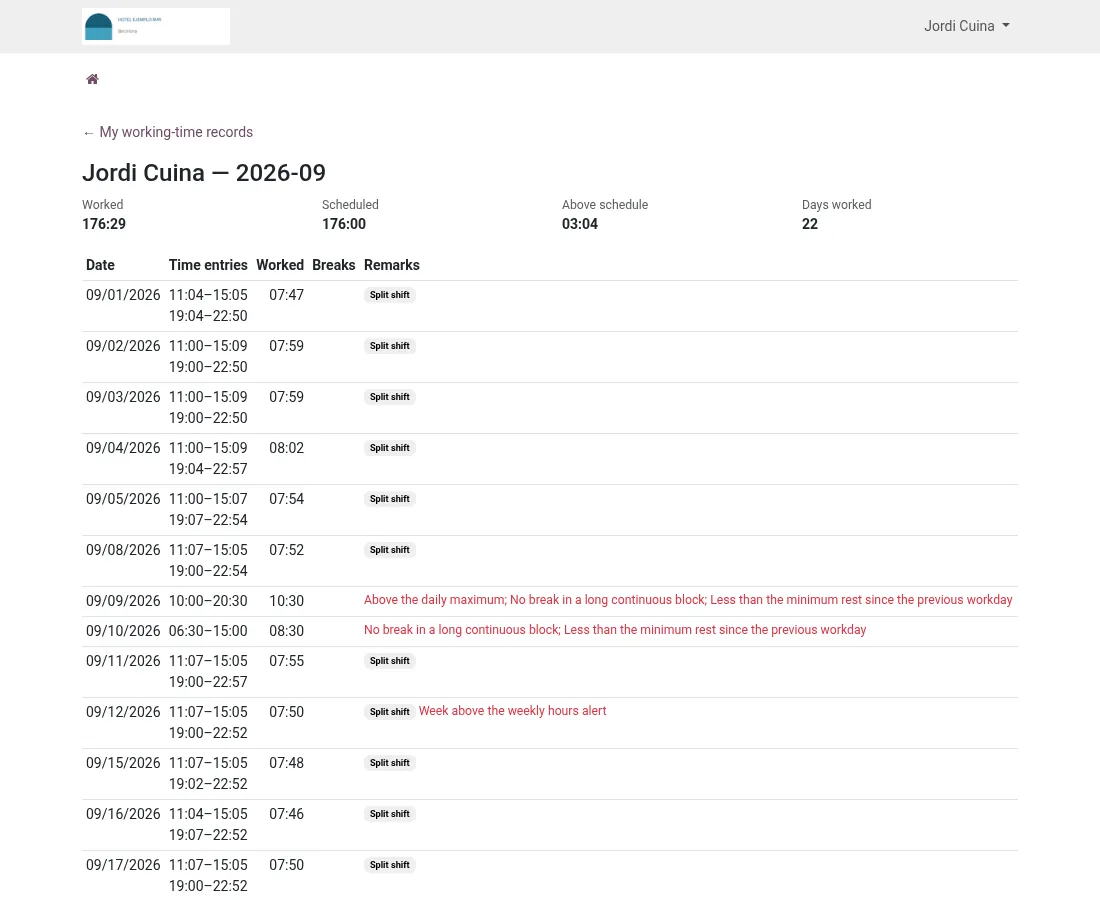
Daily maximum, breaks after long blocks, 12-hour rest between workdays, missing check-outs, overlaps and days without a record, plus weekly, monthly and yearly alerts. All thresholds follow your collective agreement.
Closed and signed every month
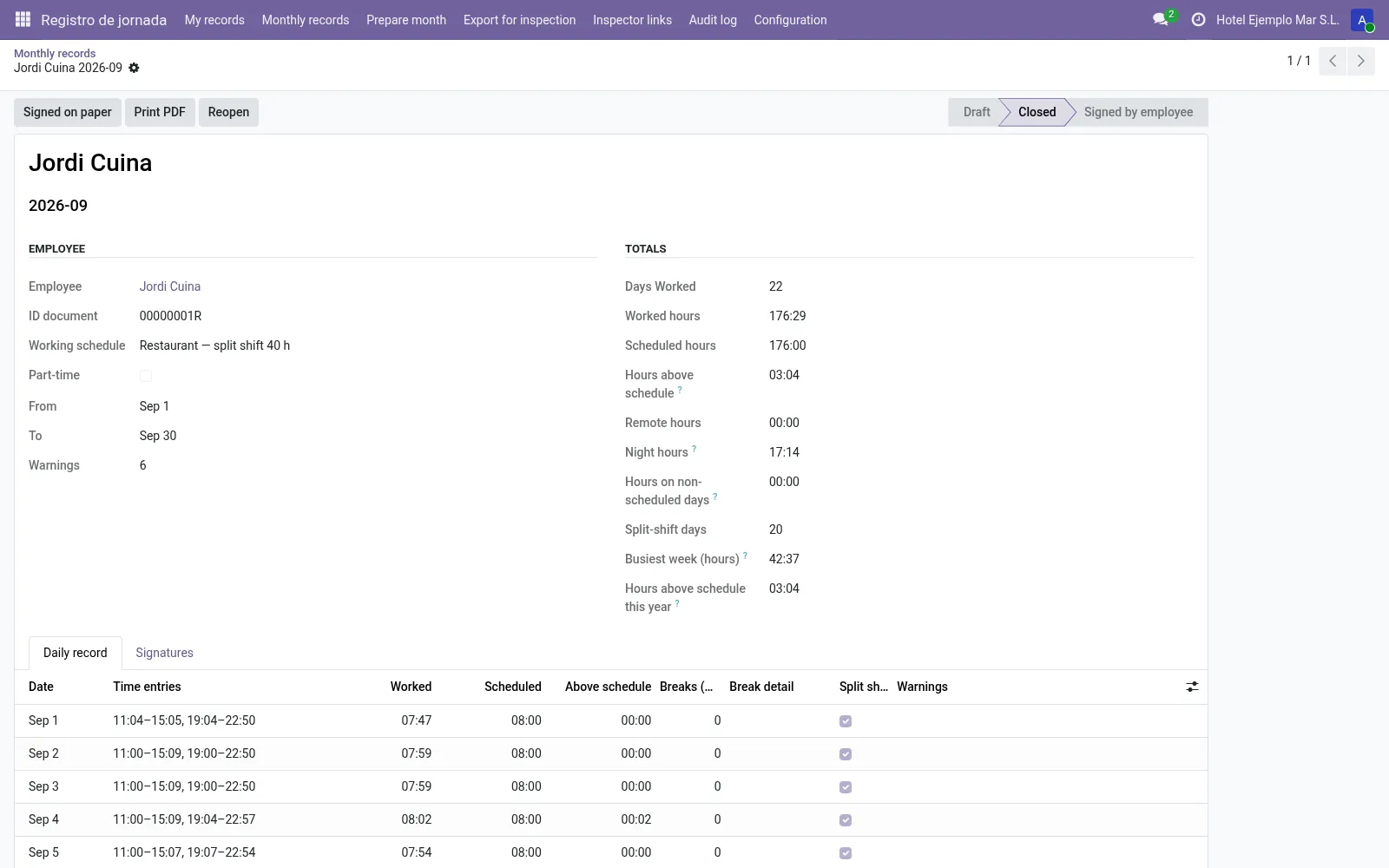
A record per employee is prepared automatically. Closing the month locks its attendances; employees review and sign in Odoo, in the portal (also on a phone) or on paper.
Inspector link
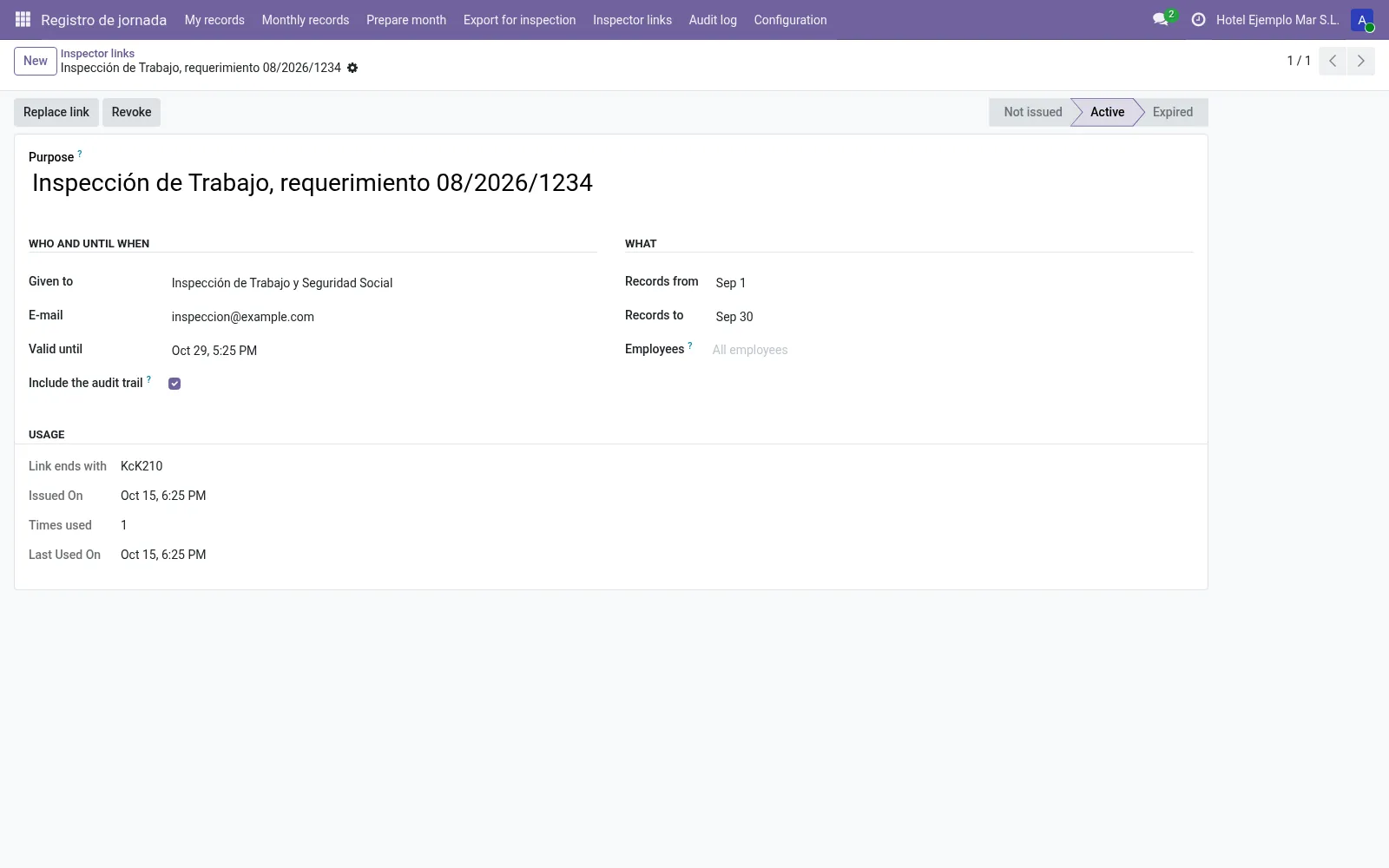
Give the inspectorate, an auditor or the workers' representatives a read-only link for a period and set of employees, with an expiry date. It can be revoked at any time and every use is logged.
Every change leaves a trace
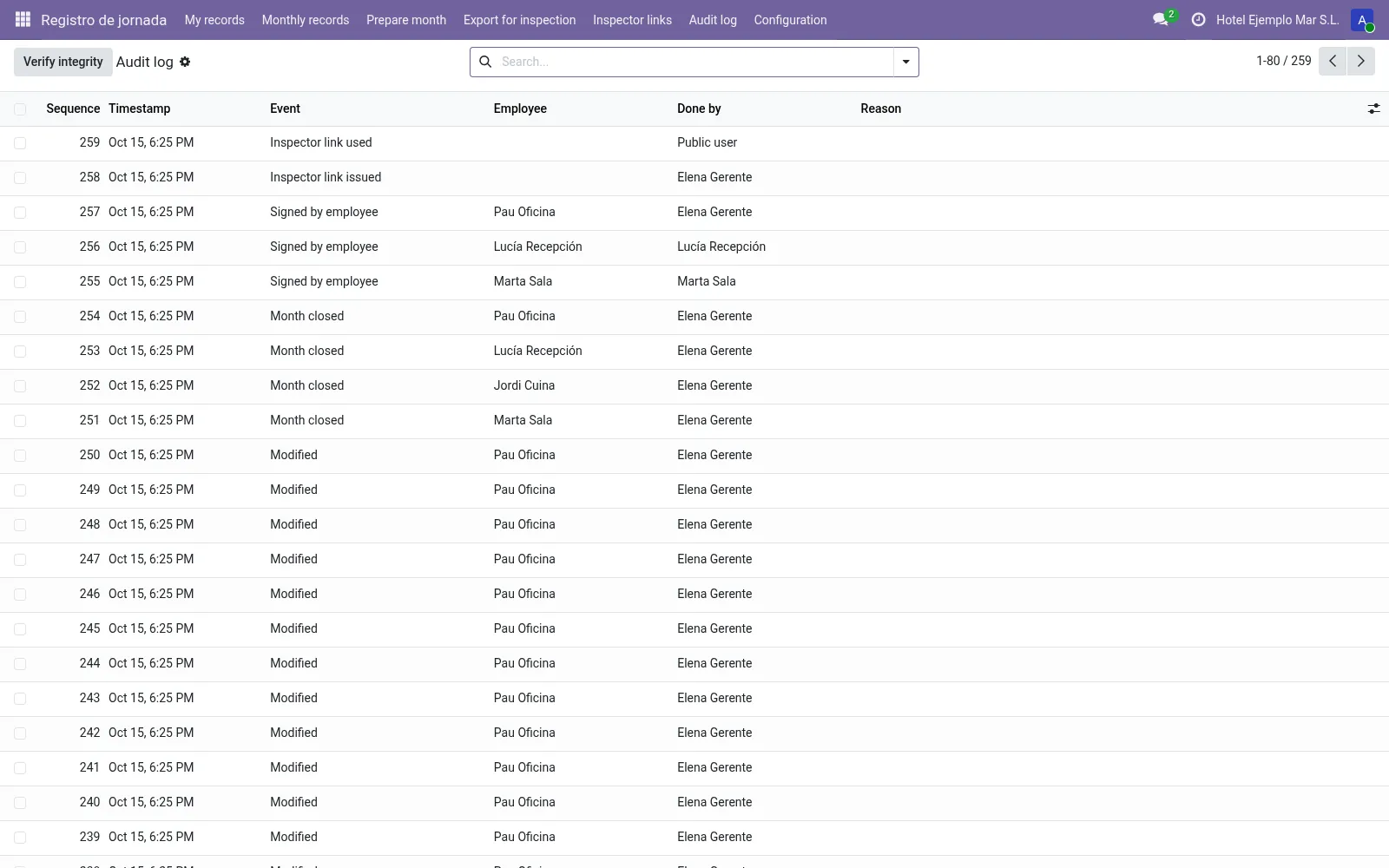
Corrections, deletions, closings, signatures, reopenings, exports and inspector access go to an append-only log, chained with SHA-256 and verified every day. Corrections need a reason.
Before you start
- Make sure employees clock in and out with Odoo Attendances (kiosk, systray or manual entries).
- Have your collective agreement at hand: daily maximum, breaks and rest rules.
Install
- Buy and download the module for your Odoo version on the Odoo Apps Store, or install it from the Apps menu if your database is linked to your store account.
- Copy the folder
l10n_es_hr_registro_jornadainto your addons path (on Odoo.sh: commit it to your repository) and restart Odoo. - In Apps, click Update Apps List, search for Registro Jornada and install it. Attendances is installed automatically if needed.
Guided setup
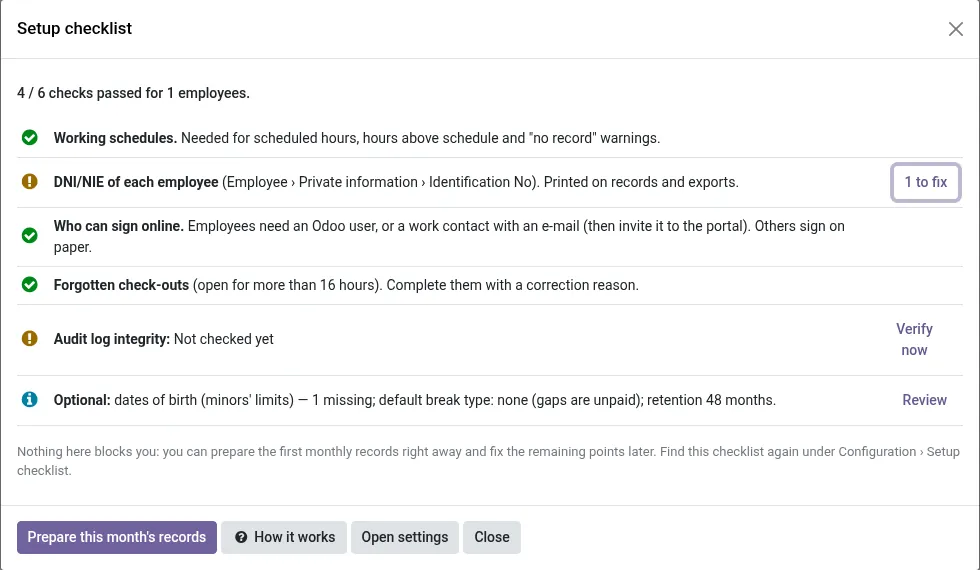
- After installation the setup checklist opens by itself (later: Configuration › Setup checklist). It lists what is missing: working schedules, DNI/NIE of each employee, who can sign online, forgotten check-outs and the integrity of the log, each with a button to fix it.
- In Configuration › Settings, check the limits and hour alerts against your collective agreement, choose a default break type and the retention period (at least 48 months).
- In Configuration › Break types, mark which breaks are paid, and optionally up to how many minutes.
- Give each employee a working schedule, so scheduled hours and hours above schedule can be shown.
Daily use
- Employees clock in and out as usual.
- At the start of each month the records of the previous month are prepared automatically (or use Prepare month).
- Review the warnings, correct attendances with a reason, then click Close month. This locks the attendances of that month.
- Employees sign under My records or in the portal (they get an e-mail with a link). Register paper signatures with Signed on paper.
- When the inspectorate asks, create an Inspector link or use Export for inspection (CSV, JSON, XML, monthly PDFs and the audit trail).
Screenshots
All screenshots show fictitious demo data.
FAQ
Is there a new law on the digital working-time record?
The obligation in force is art. 34.9 ET: a daily record of start and end times, kept four years and available to employees, their representatives and the inspectorate. A royal decree for a mandatory digital record has been in preparation; as of October 2026 it had not been published in the BOE. We plan to review the module against the final text once it is published.
Does it change how my employees clock in?
No. It works on top of standard Odoo Attendances.
Are weekly hours above 40 a breach?
Not necessarily: 40 hours per week is a yearly average, so the weekly alert is informative. You choose the thresholds, or switch an alert off with 0.
Are “hours above schedule” overtime?
They are the hours worked beyond the working schedule. Whether they count as overtime depends on your collective agreement and on how hours are distributed over the year.
How safe is the inspector link?
It contains a long random code and Odoo stores only its fingerprint. It is read-only, limited to the period and employees you choose, expires on the date you set and can be revoked at once. Every use is logged.
Can someone with database access still change the data?
The log makes changes evident; it cannot stop a person with full database access, but such changes break the chain and are reported by the daily check.
What kind of signature is it?
Signing in Odoo or the portal is a simple electronic signature (login, time and IP address). Paper signatures can be registered too.
Is any data sent outside my Odoo?
No. Nothing is sent to Normalane or any external service.
How do I install it?
Buy it for your Odoo version and download the zip from the store (or later from your orders page). Copy the folder into your addons path, update the apps list and install. On Odoo.sh, commit the folder to your repository. The Install section has every step.
What happens when I upgrade Odoo?
Since Odoo 13 the Odoo Apps Store sells each Odoo version of a module separately, so a new major version means buying the module for that version. Bug-fix updates within your version are free: download the latest zip from your orders page and replace the folder. Email us before a major upgrade and we will share any migration notes.
Does it work with several companies?
Yes. Data is kept per company with Odoo's standard multi-company rules.
How quickly do you answer support?
Email support@normalane.com or use the support button on your Odoo Apps Store orders page. A person reads every message and replies on working days (CET). Bug fixes for the purchased version are free.
Ready to use Registro Jornada Spain?
€24, one-time, per Odoo version. Bought and downloaded on the Odoo Apps Store.
En español
Registro de jornada (art. 34.9 del Estatuto de los Trabajadores) sobre Asistencias de Odoo: fichaje por quiosco, systray o portal, cierre mensual con firma del empleado, alertas de jornada y descansos, registro de cambios que deja rastro de cualquier manipulación y enlace de solo lectura para la Inspección de Trabajo.
Official sources
Need help?
Email support@normalane.com with your Odoo version and edition (Community or Enterprise). Bug fixes for the purchased Odoo version are free.
Independent module, not affiliated with or endorsed by the Ministerio de Trabajo or the Inspección de Trabajo y Seguridad Social or Odoo S.A.