Who it's for · The problem it solves
Who it's for
Spanish companies, and their accountants, that prepare the annual accounts from Odoo.
The problem it solves
The supplier payment period in the notes to the accounts is often rebuilt in a spreadsheet every year. This module computes it from your posted bills and payments, and lists every transaction behind the figure.
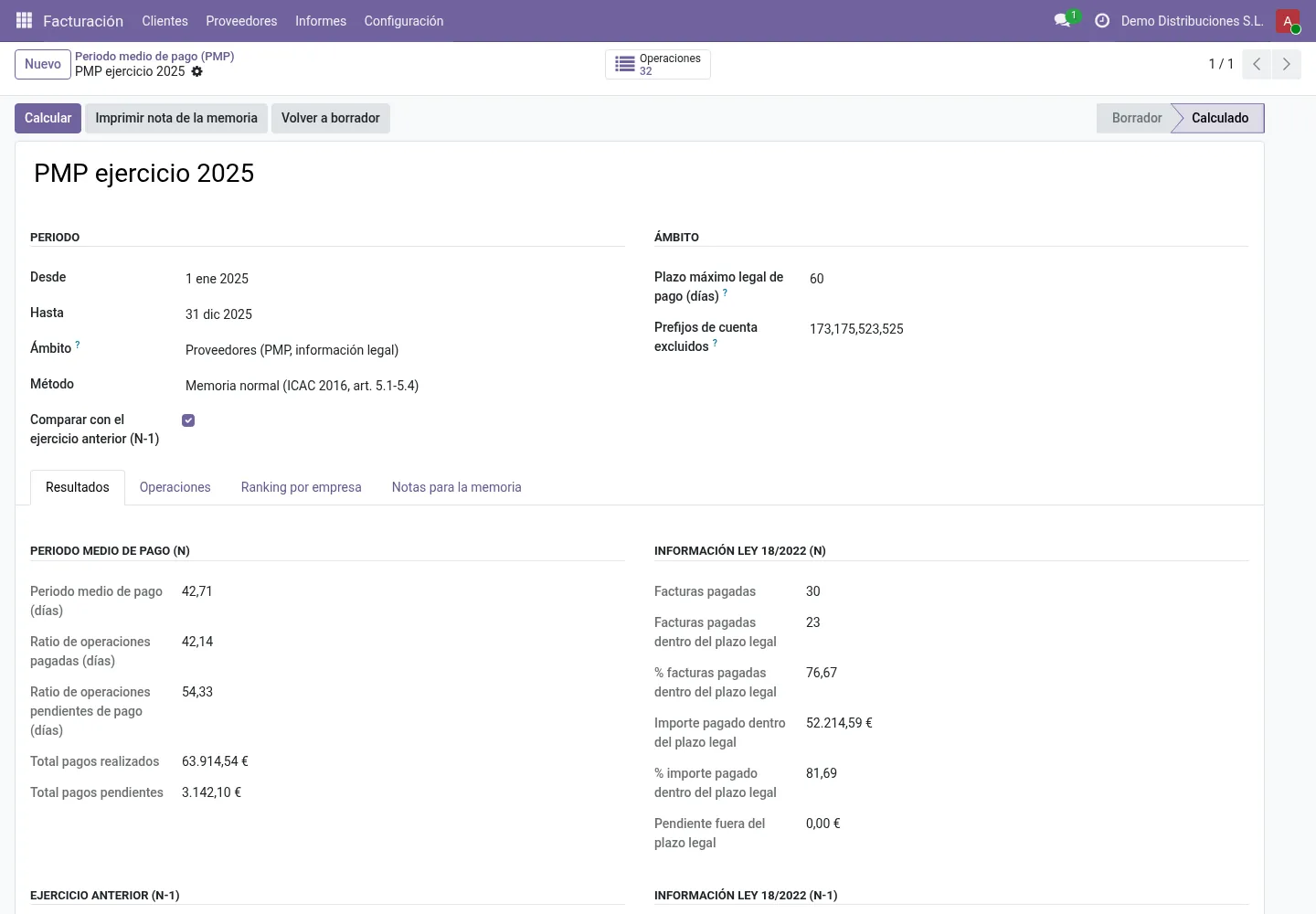
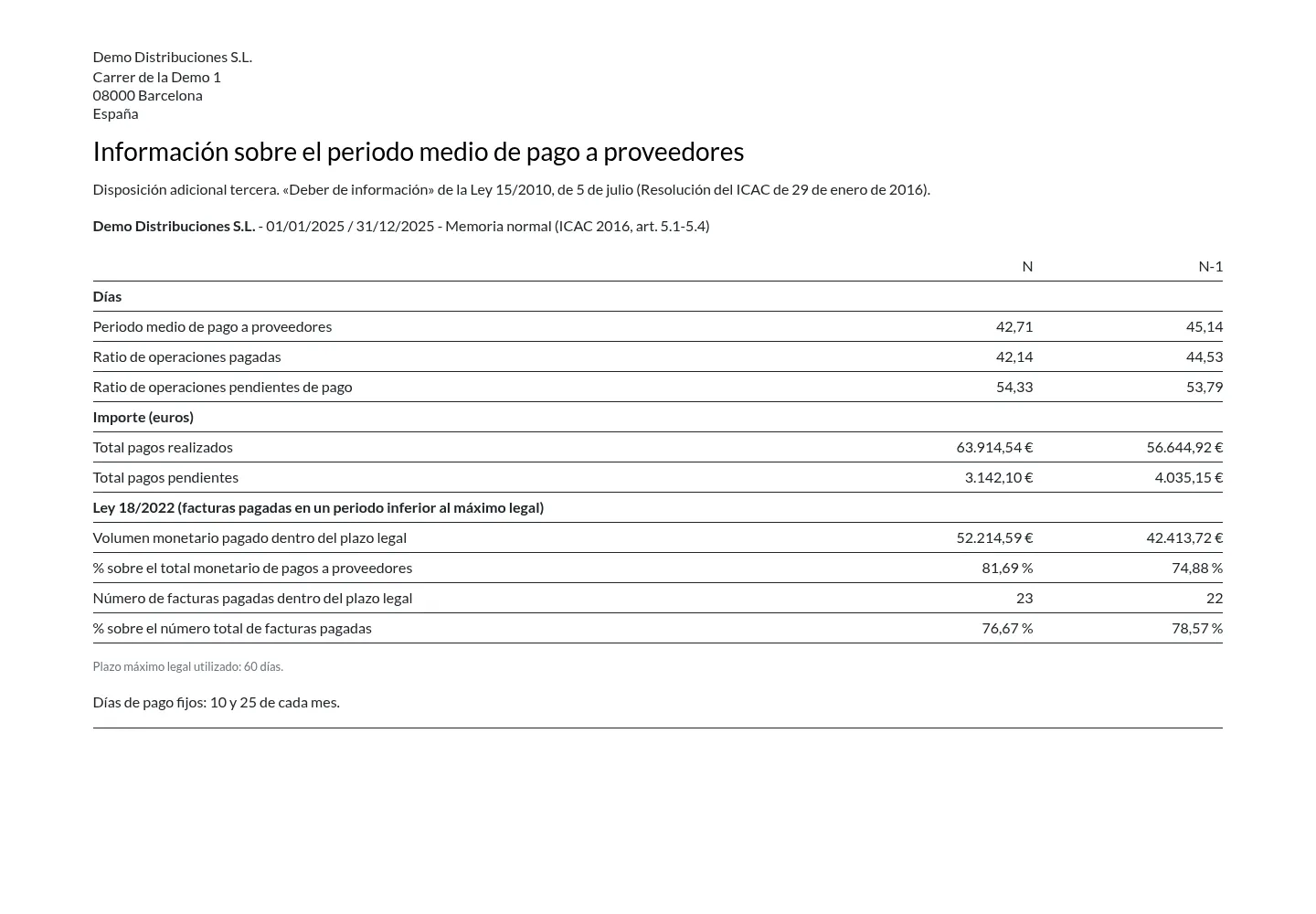
Spanish companies disclose their average payment period to suppliers (periodo medio de pago a proveedores) in the notes to the annual accounts. This module computes it from your posted vendor bills and payments in Odoo, using the ICAC method of 29 January 2016, plus the Ley 18/2022 “paid within the legal period” figures, and prints the note.
What it does
ICAC normal method
Ratio of paid transactions, ratio of transactions pending payment and the weighted PMP, as defined in the ICAC Resolution of 29 January 2016.
Abbreviated method
Average trade-creditor balance × 365 / (net purchases + external services). You choose the account prefixes.
Ley 18/2022 disclosure
Number and amount of invoices paid within the legal maximum period (default 60 days, configurable), with their percentage of the totals.
Current and previous year
The previous year is computed with the same settings, so the note's comparison table is complete.
Correct start date and scope
Optional “goods/services received on” date per bill. Exclude suppliers outside the scope, withheld bills and account prefixes. Credit notes reduce the operation.
Ranking, detail and customers too
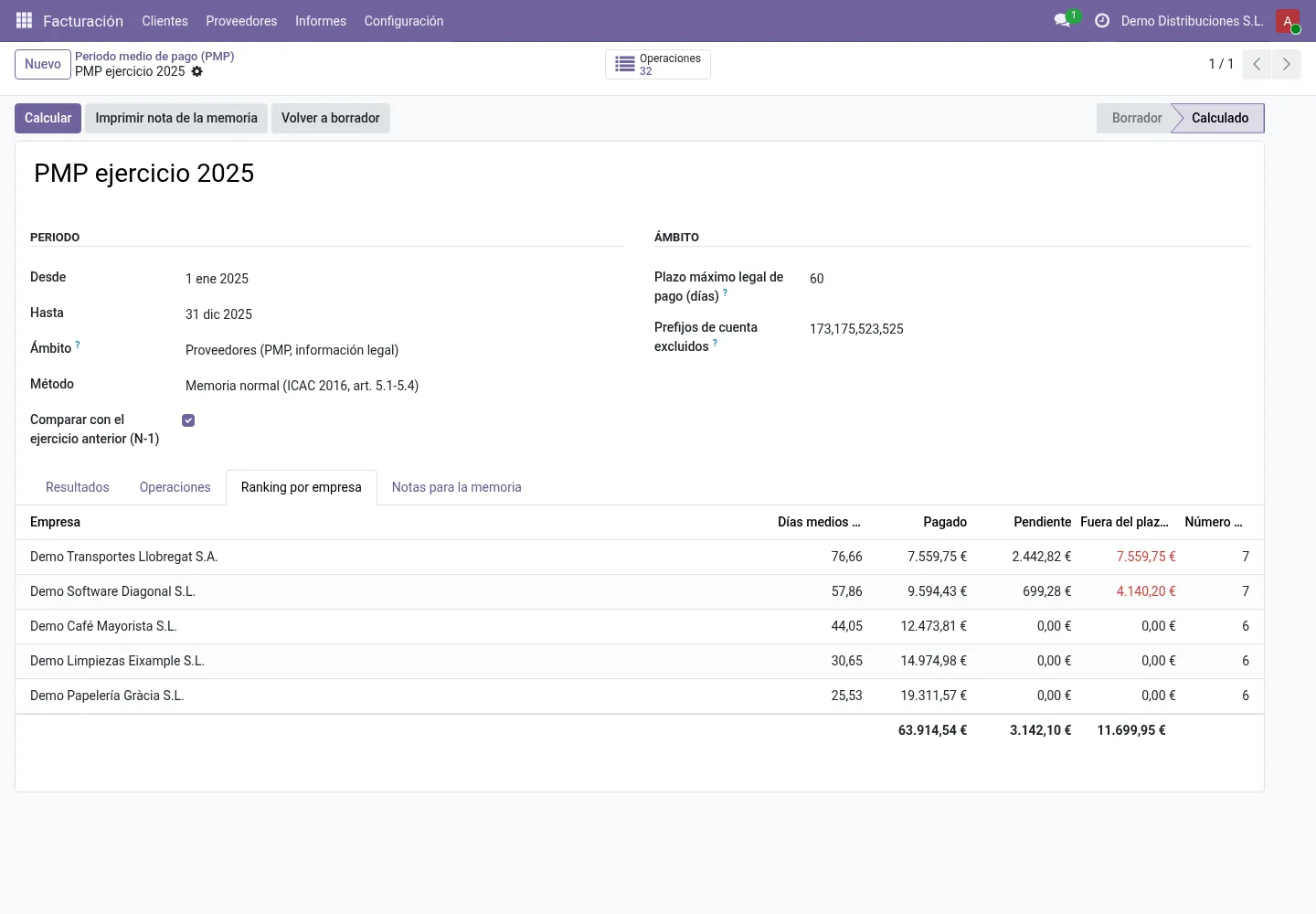
Ranking per supplier by weighted average days, every transaction listed with its dates and days, and the same analysis for customers (average collection period).
Before you start
- Vendor bills and payments should be posted and reconciled for the fiscal year you report on.
Install
- Buy and download the module for your Odoo version on the Odoo Apps Store, or install it from the Apps menu if your database is linked to your store account.
- Copy the folder
l10n_es_pmp_proveedoresinto your addons path (on Odoo.sh: commit it to your repository) and restart Odoo. - In Apps, click Update Apps List, search for PMP and install it.
Guided setup
- No setup screen is needed. Optional: on vendor bills, fill the goods/services received on date when it differs from the bill date; on suppliers outside the scope (for example fixed-asset suppliers), mark them as excluded.
Daily use
- Go to Accounting / Invoicing › Reporting › Supplier Payment Period (PMP) and create a report for your fiscal year.
- Pick the method (normal or abbreviated) and check the legal maximum days and excluded account prefixes.
- Click Compute. Review the ranking and the transactions.
- Click Print Memoria Note and add your own explanations if needed.
Screenshots
All screenshots show fictitious demo data.
FAQ
Which amounts and dates are used?
Amounts are in company currency and come from posted entries and their reconciliations. Payments are taken on the date of the payment entry. Days are calendar days and never negative (prepayments count as 0 days).
Is this accounting advice?
No. The module computes the figures with the published ICAC methodology. Your accountant or auditor remains responsible for the annual accounts.
Can I see how each number was computed?
Yes. Every paid or pending transaction is listed with its start date, payment date, days and amount.
Does it work on Odoo Online?
No. Odoo Online does not allow third-party modules. Use Odoo.sh or an on-premise installation.
How do I install it?
Buy it for your Odoo version and download the zip from the store (or later from your orders page). Copy the folder into your addons path, update the apps list and install. On Odoo.sh, commit the folder to your repository. The Install section has every step.
What happens when I upgrade Odoo?
Since Odoo 13 the Odoo Apps Store sells each Odoo version of a module separately, so a new major version means buying the module for that version. Bug-fix updates within your version are free: download the latest zip from your orders page and replace the folder. Email us before a major upgrade and we will share any migration notes.
Does it work with several companies?
Yes. Data is kept per company with Odoo's standard multi-company rules.
How quickly do you answer support?
Email support@normalane.com or use the support button on your Odoo Apps Store orders page. A person reads every message and replies on working days (CET). Bug fixes for the purchased version are free.
Ready to use PMP Proveedores Spain?
€24, one-time, per Odoo version. Bought and downloaded on the Odoo Apps Store.
En español
Calcula el periodo medio de pago a proveedores para la memoria de las cuentas anuales con la metodología del ICAC (Resolución de 29 de enero de 2016, modelo normal y abreviado) y las cifras de la Ley 18/2022, con ranking por proveedor y nota imprimible.
Need help?
Email support@normalane.com with your Odoo version and edition (Community or Enterprise). Bug fixes for the purchased Odoo version are free.
Independent module, not affiliated with or endorsed by the ICAC or Odoo S.A.