Who it's for · The problem it solves
Who it's for
Spanish companies and self-employed people who invoice in Odoo, and their advisers (gestorías).
The problem it solves
Every January and February someone adds up a year of invoices per customer and supplier, per quarter, and chases contacts to agree the figures. This module does the sums, flags missing or wrong NIFs, writes the letters and creates the file for the AEAT.
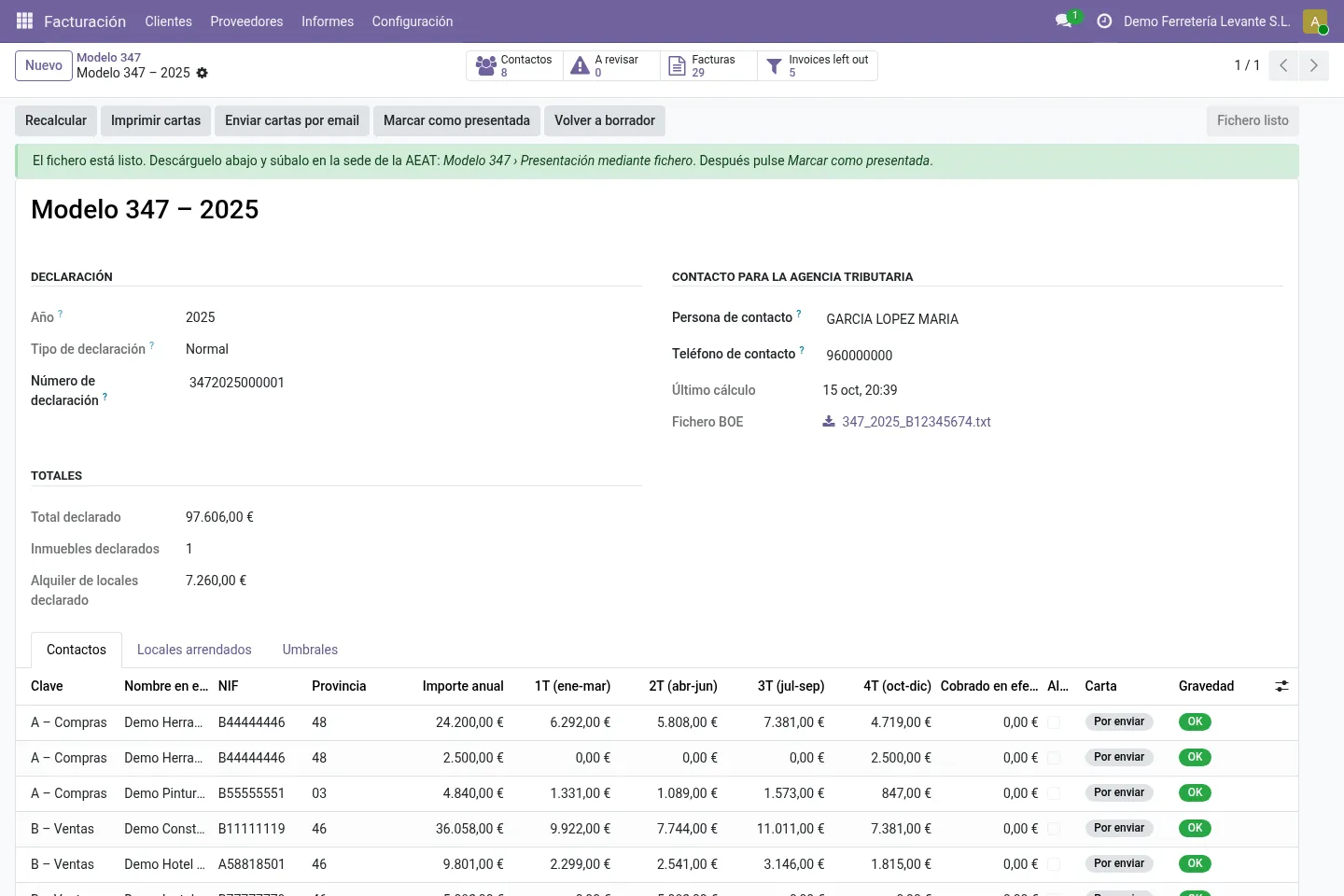
Spanish businesses report every customer and supplier with whom they exceeded €3,005.06 in the year on Modelo 347, the declaración anual de operaciones con terceras personas. This module reads your posted invoices in Odoo, adds them up per contact and quarter, flags what needs fixing, writes a letter to each contact and generates the file you upload yourself on the AEAT website (presentación mediante fichero).
What it does
Per contact and per quarter
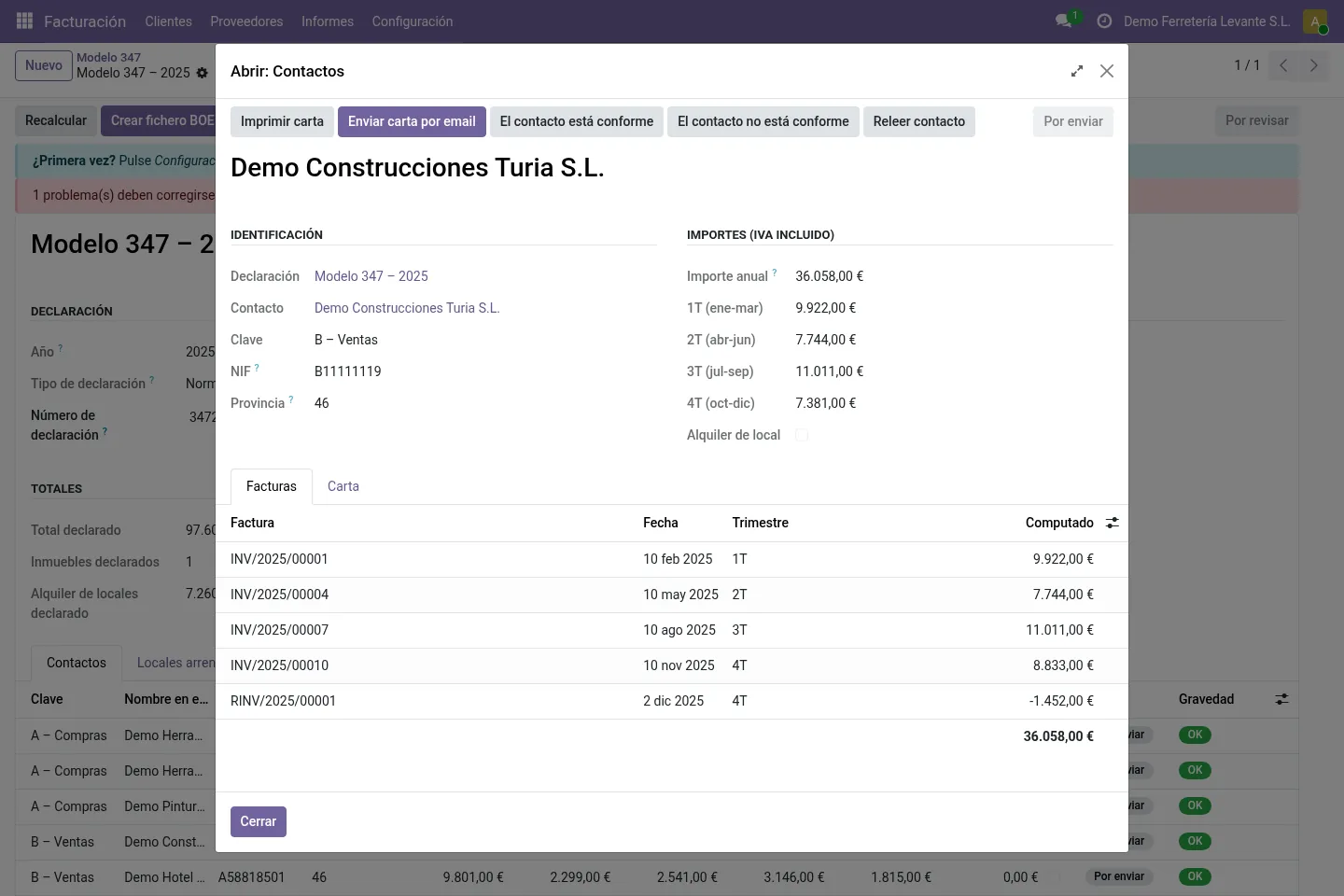
Sales (key B) and purchases (key A) added up separately, VAT included, credit notes in their own quarter. Contacts that share a NIF are merged. Threshold €3,005.06, editable.
Cash above €6,000
Payments in your cash journals are reported per contact, including cash received this year for invoices of earlier years, on a separate line as the AEAT asks.
Rent and real estate
Rent of business premises is reported apart; as landlord your premises are listed with cadastral reference and address. Sales of real estate subject to VAT get their own boxes.
Automatic exclusions with a reason
Intra-EU operations (Modelo 349), imports and exports of goods and invoices with an income-tax withholding (Modelo 190/180) are left out, with the reason shown for every invoice.
Review and checks
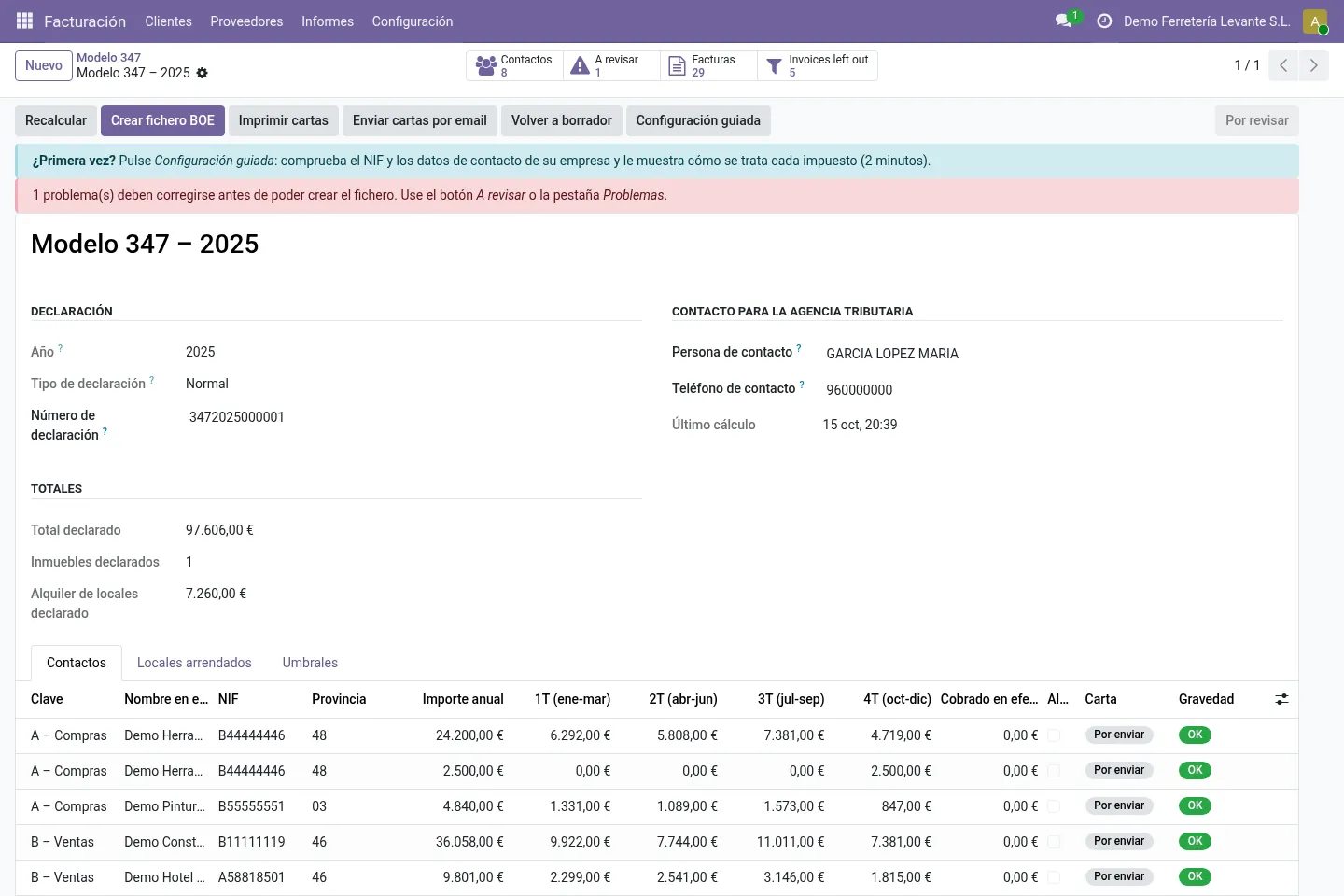
One line per contact with the four quarters and a red, amber or green check: NIF/NIE check character, province, name order, EU VAT numbers, company NIF and phone. The file is not created while an error remains.
Partner letters and AEAT file
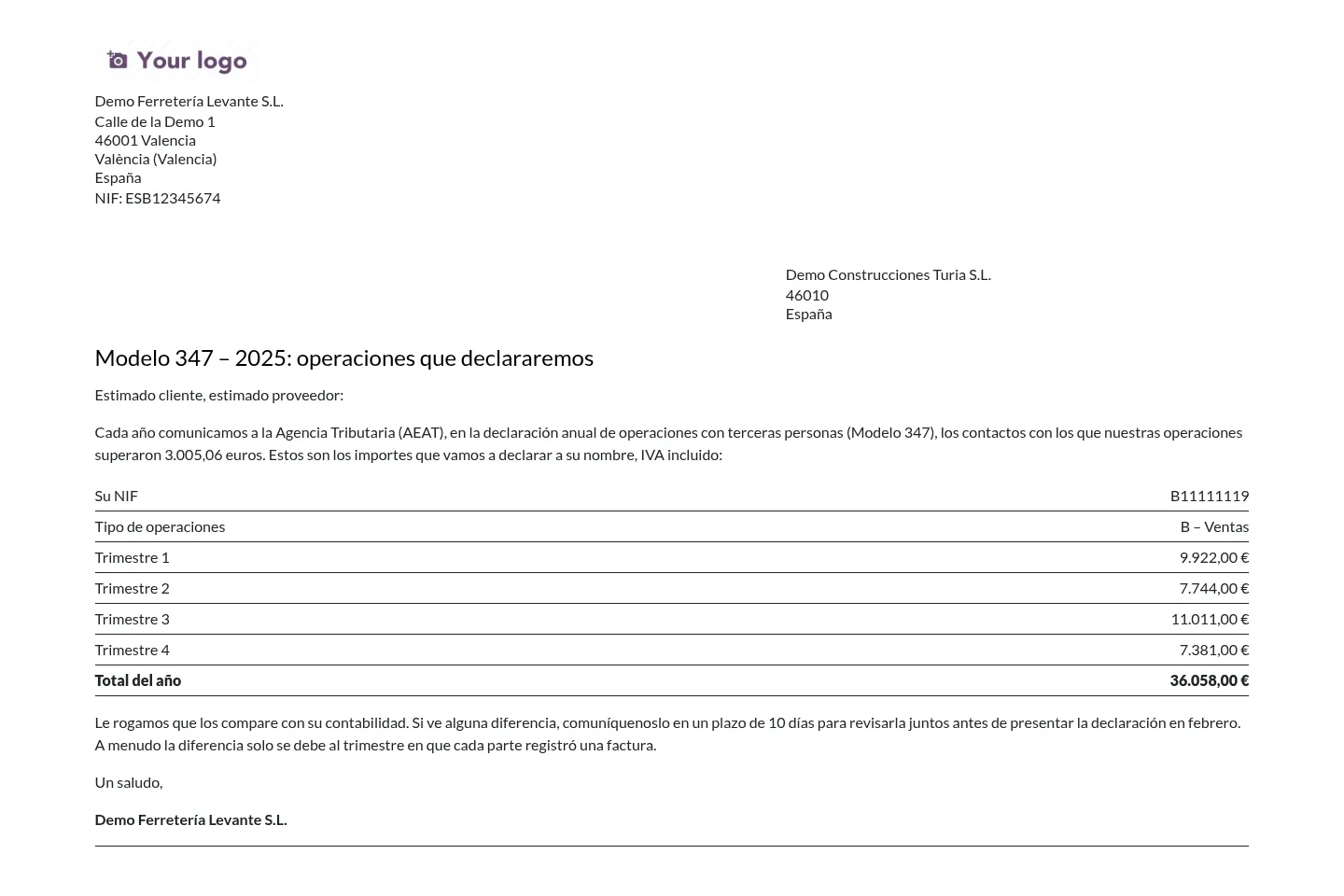
Print or email one letter per contact, in the contact's language, and record who agrees. The file uses 500-character records from the AEAT layout for 2025 and later.
Before you start
- Customer invoices, vendor bills and cash payments for the year should be posted.
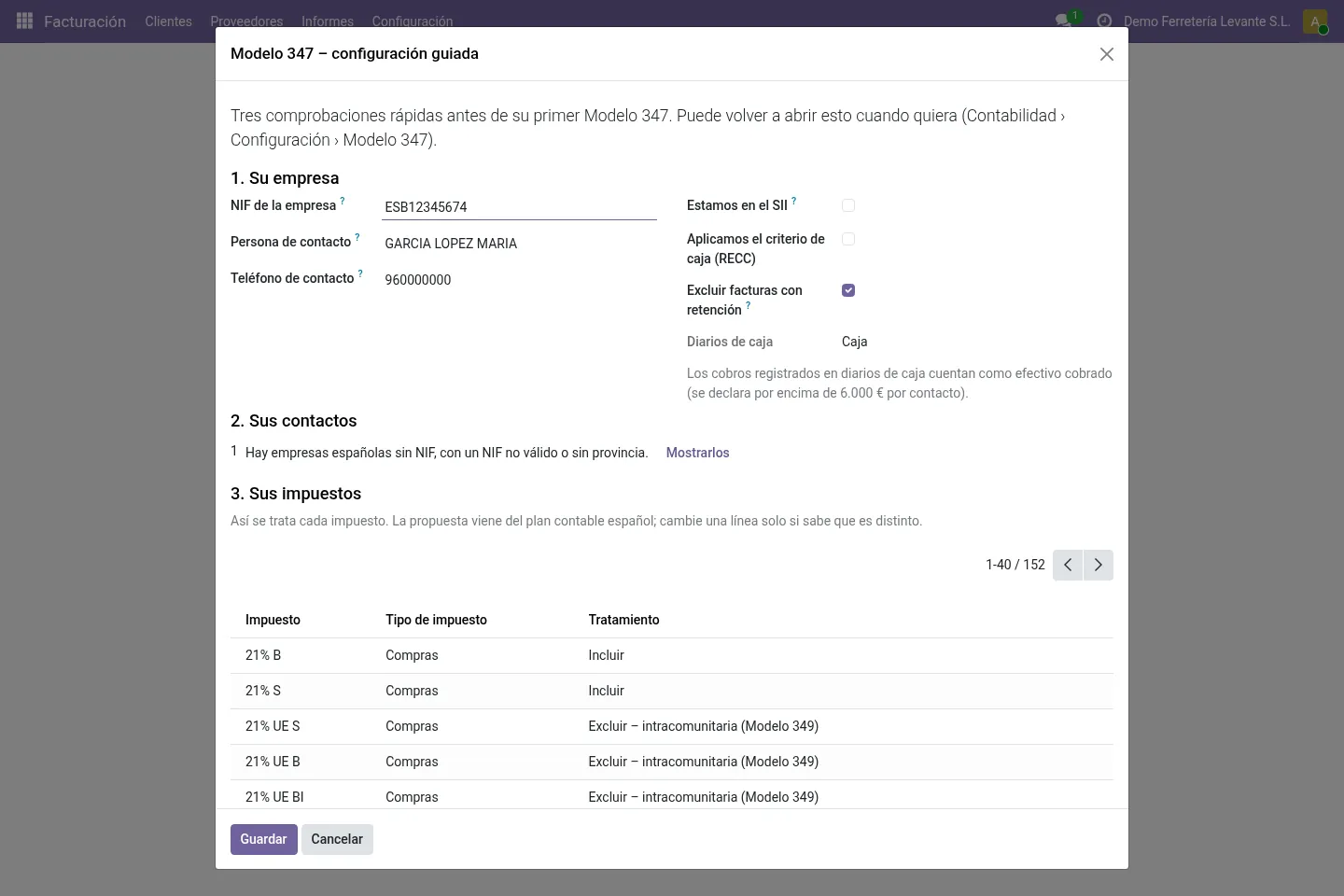
- Your company needs its NIF, a contact person and a 9-digit phone number; the guided setup checks them.
- Companies that keep their VAT books in the SII do not file Modelo 347. The module warns you if your company is marked as SII.
Install
- Buy and download the module for your Odoo version on the Odoo Apps Store, or install it from the Apps menu if your database is linked to your store account.
- Copy the folder
l10n_es_modelo347_boeinto your addons path (on Odoo.sh: commit it to your repository) and restart Odoo. - In Apps, click Update Apps List, search for Modelo 347 and install it.
Guided setup
- Open Invoicing › Configuration › Modelo 347 › Guided setup. It checks your company NIF and contact details, SII and cash-basis VAT (RECC) status and your cash journals.
- Check how each of your taxes will be treated; it is recognised from the Spanish chart of accounts. Change a line only if your case is different.
- If you rent out business premises, add them under Modelo 347 › Business premises.
Daily use
- Go to Invoicing › Reporting › Modelo 347, press New, pick the year and press Compute.
- Open the contacts marked To check, fix them and press Re-read contact; no need to recompute.
- Use Print letters or Email letters, and record whether each contact agrees.
- Press Create BOE file, upload it on the AEAT website and press Mark as filed.
Screenshots
All screenshots show fictitious demo data.
FAQ
Does it file the return for me?
No. It generates the file and helps you prepare the return. Signing in to the AEAT electronic office (certificate or Cl@ve, or through your adviser), uploading, fixing anything the AEAT validation reports and keeping the receipt stay with you or your adviser.
Can I file a complementary or substitutive return?
Yes. Normal, complementary and substitutive returns are supported, and keys C to G cover the special cases.
What is not covered?
The insurance operations and customs-deposit flags, the legal representative of minors and check digits of cadastral references (only the format is checked). Key E (public entities) is a manual key only.
In which language are the letters?
Each letter is printed in the contact's language. The module ships in English, Spanish and Catalan.
Is it legal or tax advice?
No. The module follows the record layout published by the AEAT. You or your adviser remain responsible for what is filed.
Does it work on Odoo Online?
No. Odoo Online does not allow third-party modules. Use Odoo.sh or an on-premise installation.
Does it work on Odoo Enterprise?
It is tested and listed on Community. It only depends on Accounting / Invoicing, but we have not tested it on Enterprise, so we do not claim it. Planning to use Enterprise? Email support@normalane.com before you buy.
How do I install it?
Buy it for your Odoo version and download the zip from the store (or later from your orders page). Copy the folder into your addons path, update the apps list and install. On Odoo.sh, commit the folder to your repository. The Install section has every step.
What happens when I upgrade Odoo?
Since Odoo 13 the Odoo Apps Store sells each Odoo version of a module separately, so a new major version means buying the module for that version. Bug-fix updates within your version are free: download the latest zip from your orders page and replace the folder. Email us before a major upgrade and we will share any migration notes.
Does it work with several companies?
Yes. Data is kept per company with Odoo's standard multi-company rules.
How quickly do you answer support?
Email support@normalane.com or use the support button on your Odoo Apps Store orders page. A person reads every message and replies on working days (CET). Bug fixes for the purchased version are free.
Ready to use Modelo 347 Spain?
€14, one-time, per Odoo version. Bought and downloaded on the Odoo Apps Store.
En español
Prepare en Odoo la declaración anual de operaciones con terceras personas (Modelo 347): importes por contacto y trimestre, efectivo por encima de 6.000 €, arrendamientos, comprobaciones de NIF, cartas a cada contacto y el fichero para presentar en la sede de la AEAT.
Need help?
Email support@normalane.com with your Odoo version and edition (Community or Enterprise). Bug fixes for the purchased Odoo version are free.
Independent module, not affiliated with or endorsed by the AEAT or Odoo S.A.